Every output is a draft. DeepInfinity Scribe produces draft documentation for a clinician to review, edit and approve. Nothing enters a patient record until a healthcare professional approves it. That principle sits behind every answer below.
Can clinicians edit the documentation it produces?
Yes. Every section of every draft is editable, and editing is not optional — it is the workflow. The clinician reviews, corrects and approves the draft before it is used or transferred into the patient record.
The software never produces a final or signed record on its own. The reporting clinician remains the responsible decision-maker throughout.
Where can we use it?
DeepInfinity Scribe runs as a cloud-native application across a single shared processing pipeline, accessible through:
- Web browser, with no local installation
- Desktop applications for Windows and macOS
- Mobile applications for iOS and Android
- A Chrome extension, for dictating into browser-based clinical systems
- A Microsoft Word add-in, for drafting inside the document
- Authorised API integrations with connected clinical systems
Does it support virtual consultations?
Yes, indirectly. Our speech-to-text capabilities can be used alongside any virtual consultation tool you already use. If the consultation audio isn’t captured natively on the same system running our software, an additional microphone or audio-capture device may be required to route the audio in. We’ll work with you to confirm the right setup before deployment.
Can it be used for radiology reporting?
Yes. DeepSpeed Rad Scribe captures radiologist dictation and maps it to modality-specific report templates covering CT, MRI, plain film and ultrasound, and integrates with RIS, PACS and HIMS systems.
It performs dictation capture and template mapping. It does not interpret images, detect abnormalities, or assign clinical urgency — the radiologist does all of that, and the software structures what they dictate.
How accurate is the transcription?
DeepScribe’s speech-to-text engine achieves approximately 93–99% word-level accuracy on differently-accented clinical English and other language consultations, measured against clinician-verified transcripts across a validation set of over [CONFIRM: N] recorded OPD consultations.
Accuracy varies by condition:
| Condition | Typical accuracy |
|---|---|
| Quiet room, single speaker, clear audio | ~95–99% |
| Moderate background noise (busy OPD) | ~90–93% |
| Overlapping speech / multiple speakers | ~85–90% |
| Heavy accent + fast speech rate | ~85–90% |
How do you ensure the output is accurate, complete and relevant?
Three layers:
- A clinical vocabulary layer that resolves medical terminology before structuring
- An iterative review process for prompts and model behaviour, informed by clinician feedback and specialty input, with changes controlled under our quality management system
- Mandatory clinician review before any draft is used
We are direct about the limits of the first two. Speech recognition and language models can produce errors that read as plausible and grammatically correct — substituted words, incorrect laterality, reversed negation, wrong numbers. The third layer is not a formality; it is the control that makes the first two safe.
Does it cope with regional and international accents?
Yes, and this is one of the areas our clinical users comment on most. The engine handles a wide range of accents, including non-native English speakers and clinicians using regional names and terminology that general-purpose dictation tools frequently miss.
Performance still varies. We recommend a short familiarisation period at the start of any deployment so users can see how it behaves with their own voice and setting.
Does it work in languages other than English?
Yes. DeepConverse AI captures consultations in Hindi, Telugu, Tamil, Kannada, Marathi and other languages, and renders the spoken content into a structured English draft — useful where the consultation happens in one language and the record is kept in another.
Where the accuracy of a patient’s own words carries clinical weight, confirm meaning directly with the patient or a qualified interpreter. The software supports multilingual documentation; it does not replace professional interpreting.
How does it handle background noise?
Noise handling combines audio pre-processing with the recognition engine itself, and the software is in daily use in busy departments including a government hospital processing over 700 scans a day.
Environment still matters. Microphone choice and placement make more difference than any other single factor, and we cover this during deployment.
Is DeepInfinity Scribe a medical device?
Yes. DeepInfinity Scribe is Class I medical device software under the UK Medical Devices Regulations 2002 (as amended). Conformity is self-declared by the manufacturer and the device carries the UKCA marking.
DEEPINFINITY LTD is registered with the MHRA as a medical device manufacturer, confirmed on 30 July 2026, and the registration appears on the MHRA Public Access Registration Database.
To be precise about what that means: registration with the MHRA is a legal requirement for placing a device on the Great Britain market. It is not an accreditation, certification or approval of the device by the UK Competent Authority, and we don’t describe it as one.
Does it diagnose, detect or triage anything?
No. DeepInfinity Scribe is a documentation tool. It is not intended for autonomous diagnosis, treatment decisions, clinical triage, image interpretation, abnormality detection, or patient monitoring, and must not be relied on for any of them.
Clinical content in a draft comes from what the clinician said during the consultation or dictation. The software structures and transcribes; it does not add clinical judgement.
Do you comply with DCB0129, and do you have a Clinical Safety Officer?
Yes to both. We operate a clinical risk management system compliant with DCB0129, the NHS standard that applies to manufacturers of health IT systems, and a Clinical Safety Officer is appointed: Zoe Alexandra Oparah, [CONFIRM: clinical registration].
We maintain a Clinical Risk Management Plan and File, a Hazard Log for each module, and a Clinical Safety Case Report reviewed at each significant release.
Will you support our DCB0160 assessment?
Yes. DCB0129 covers us as the manufacturer; DCB0160 covers you as the deploying organisation. Our Clinical Safety Case Report, Hazard Log and residual risk statements are available to your Clinical Safety Officer under NDA, so your assessment rests on our evidence rather than assumptions about it.
Do you have a completed NHS DTAC?
Yes. We have completed the DTAC v2.0 self-assessment across all five domains — clinical safety, data protection, technical security, interoperability, and usability and accessibility — and provide it to NHS organisations on request.
DTAC is a supplier self-assessment that the buying organisation reviews. No body issues a DTAC certification or approval, so any supplier describing themselves as “DTAC certified” is overstating it.
How do we report a fault or a safety concern?
Contact us at [email protected] or +44 7359 359232. Report any suspected malfunction, any occasion where incorrect documentation reached a patient record, and any event that led or might have led to harm.
Users in Great Britain can also report adverse incidents involving a medical device to the MHRA through the Yellow Card scheme. NHS organisations should additionally follow their own local incident reporting procedures.
Do you share or sell our data? Do you train models on it?
We do not sell data processed through DeepInfinity Scribe, and we do not share it with third parties for any purpose other than delivering the service.
[CONFIRM: model-training answer — the question asks it and the drafted answer does not address it]
Where is our data hosted?
DeepInfinity Scribe runs on Microsoft Azure in the UK South region, with failover to UK West. Data remains within the United Kingdom. Our full sub-processor list is available on request.
Can it be deployed inside our own network?
On-premise deployment is not currently available, but it’s on our roadmap and coming soon. Today, DeepInfinity is deployed on Azure cloud infrastructure. If on-premise deployment is a requirement for your organisation, reach out to us to discuss your timeline and we’ll keep you updated as this becomes available.
Are consultation recordings retained?
Audio recordings, transcripts, and generated drafts are retained for 30 days, after which they are automatically deleted. This retention period allows for review, correction, and re-processing if needed during the consultation workflow.
[CONFIRM: whether retention is configurable — if so, state that organisations can request a different period]
What security certifications do you hold?
- ISO/IEC 27001:2022 — certified information security management system
- ISO 9001:2015 — certified quality management system
- Cyber Essentials and Cyber Essentials Plus
- Independent penetration testing across application, infrastructure and APIs
- ICO registration ZC195380, with UK GDPR and the Data Protection Act 2018 as our primary framework
Does it integrate with our existing systems?
Yes. DeepInfinity Scribe integrates with EHR, EPR, PACS, RIS and HIMS platforms, plus Microsoft Word and browser-based systems, without replacing anything you already run.
[CONFIRM: which named live integrations to list for a UK audience]
How long does deployment take, and what support comes with it?
Typical deployment takes [CONFIRM: 1–2 weeks], depending on the number of modules and integrations involved. This includes:
- Information governance and DPA sign-off — reviewing and agreeing data processing terms with your organisation before any patient data is processed.
- Technical configuration and integration testing — setting up the system for your environment (EHR integration, speech recognition tuning for local accents and languages, workflow configuration) and testing end-to-end before go-live.
- Clinical safety documentation — supporting your DCB0160 clinical safety case with the relevant hazard and risk documentation from our side.
- User training — onboarding sessions for clinicians and staff who’ll use the system day-to-day.
- Post-go-live review — a check-in after launch to confirm the system is working as expected and address any early issues.
How is DeepInfinity different from other AI scribes?
Three things, honestly stated:
- One pipeline, three workflows. General clinical notes, doctor–patient consultations and radiology dictation run on the same core engine, so a Trust adopting it for one department isn’t procuring a second product for the next.
- Multilingual capture built in, not bolted on. Consultations in Hindi, Telugu, Tamil, Kannada, Marathi and other languages, rendered into structured English drafts.
- Radiology depth. Modality-specific templates across CT, MRI, plain film and ultrasound, with RIS and PACS integration — built with radiologists using it daily at volume.
Is there a single page where I can view all product details?
Click the link below to view DeepInfinity product details:
How to get DeepInfinity App from Microsoft Store?
Click the link below to get DeepInfinity App from Microsoft Store:
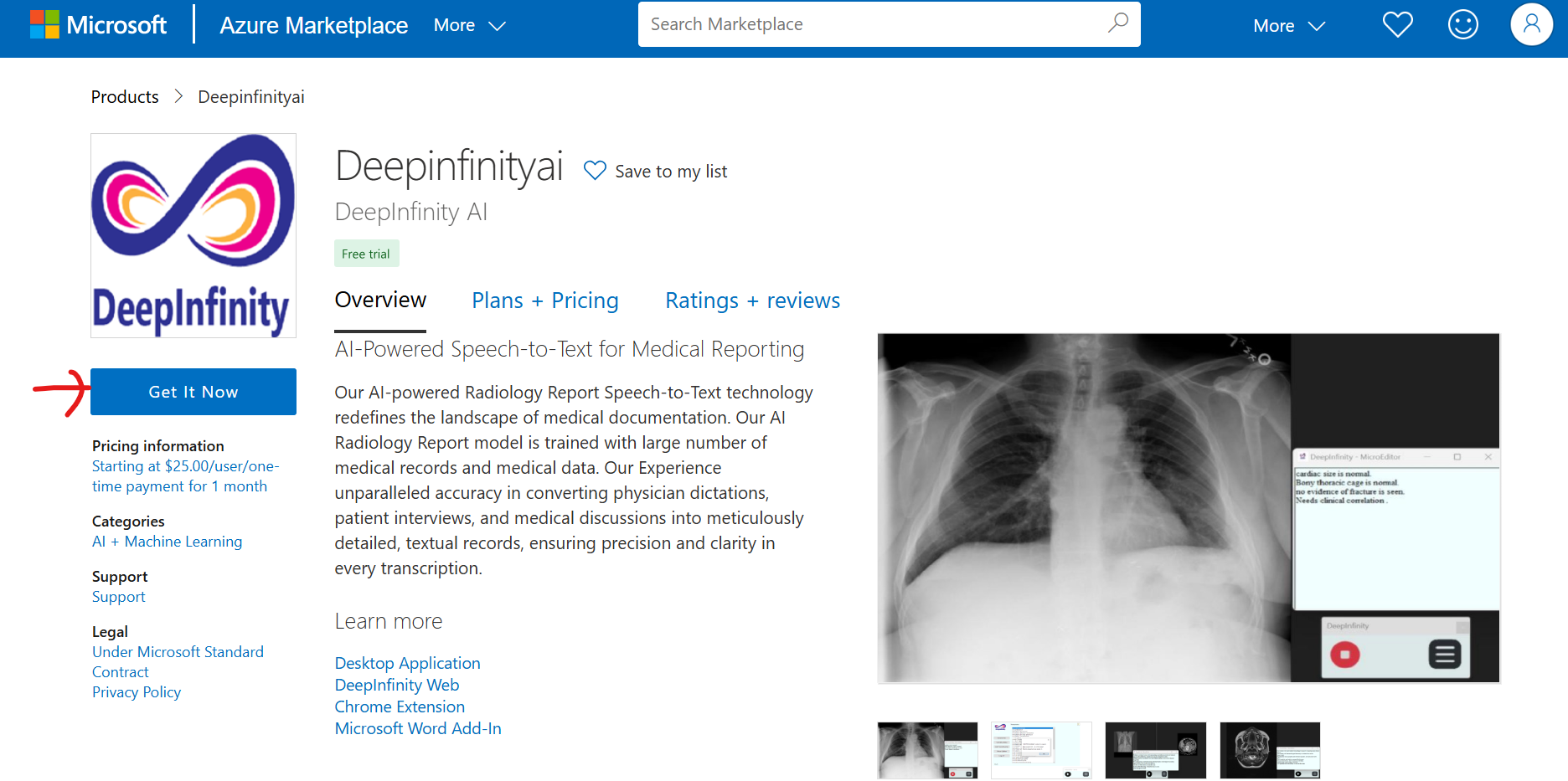
How to get DeepInfinity AI SaaS services from Azure Marketplace?
Step 1: Open the Azure Marketplace link below:
DeepInfinity AI Azure Marketplace
Step 2: Click Get it Now and proceed with the required details.
What products do you offer for radiology reporting?
We offer a suite of tools designed to simplify and enhance radiology reporting:
- Chrome Plugin: Quick access to reporting features directly in your workflow.
- DeepInfinity Web App: A user-friendly application for on-the-go reporting.
- Web UI: A comprehensive browser-based interface for advanced radiology workflows.
- Word Plugin: Streamlined reporting directly inside Microsoft Word.
DeepInfinity Radiology Report Chrome Plugin
DeepInfinity Web UI for Radiology Reporting
DeepInfinity Word Plugin for Radiology Reporting
Need the Web App installation link? Contact us:
How to install DeepInfinity App for Radiology Reporting?
Step 1: Login to DeepInfinity and click Try AI Radiology Report.

Step 2: Click Download Installer.

Step 3: Extract the ZIP and run Deepinfinity.exe.

Step 4: Install Visual C++ if prompted.

Step 5: Click More Info and then Run Anyway.


Continue installation by clicking Next through the installer screens, agree to the terms, then launch the app and login with your credentials.
How to use DeepInfinity App in PACS/RIS, MS Word, or OpenOffice?
Watch the user guide video below:
DeepInfinity Speech To Text App user guide in any PACS reporting system
How to install DeepInfinity Word Plugin for Radiology Reporting?
You can also get it directly from Microsoft AppSource:
Get DeepInfinity Word Plugin from Microsoft Store
Then open Word, go to Add-Ins, choose More Add-Ins, search for DeepInfinity, add it, and continue setup.

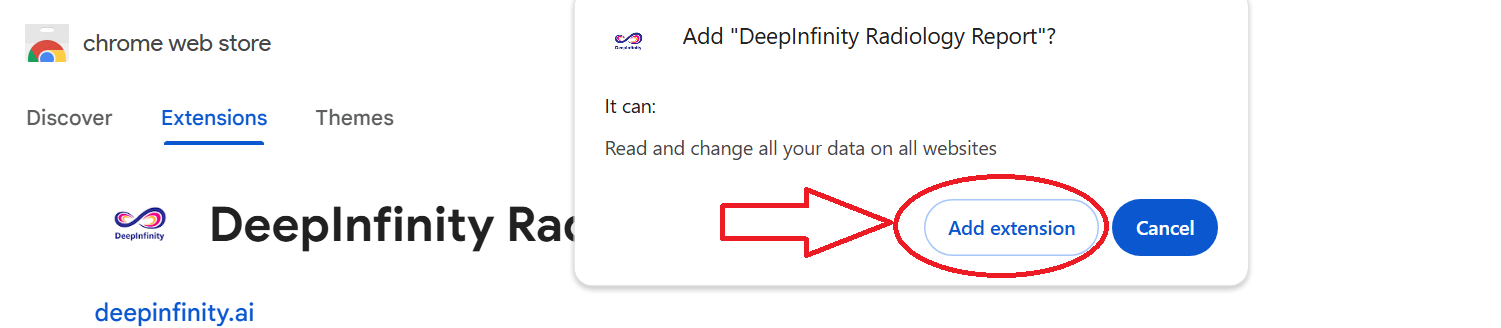
How to install DeepInfinity Radiology Report Chrome Plugin?
Step 1: Open the Chrome Web Store link below:
Step 2: Click Add to Chrome.

Step 3: Click Add Extension.
How to use DeepInfinity Chrome Plugin for Radiology Reporting?
Watch the Chrome Plugin user guide video below:
How to register to access DeepInfinity Chrome Plugin?
Step 1: Click the Sign Up button and register with your email address.

Step 2: Use the same credentials to login to the DeepInfinity Chrome Plugin.
How to take subscription for DeepInfinity Chrome Plugin?
Once your 3-day free trial expires, please use the subscription page below:
Click Here to take Subscription for DeepInfinity Chrome Plugin
How to fix enable microphone for DeepInfinity Chrome Plugin?
Click the site settings icon on the left side of the browser tab and enable microphone access if disabled.

Why does DeepInfinity Chrome Plugin microphone stop after 10 seconds?
If the microphone stops after 10 seconds, make sure the plugin is not active in another browser tab. Turn it off in other tabs or close the previous tab.
How to use AI for radiology report generation?
Navigate to the APIs menu and select AI Radiology Report Generation. Click the play button to start recording and pause to stop.
How to unblock pop-ups and allow?
Go to your browser settings and open Site Settings. Under Pop-ups and redirects, allow pop-ups if needed.
How to use convert audio API?
Navigate to the APIs menu and select Convert Audio API. If you are a subscriber, you can use it directly or request access.
How to Register?
Click on Login in the navigation bar, then choose the sign-up option and provide the required details to register.
How do you get access to doctor-patient conversation API?
In the website navigation bar, open APIs and select Doctor-Patient Conversation API. If you do not yet have access, you can request it.
How do you view reports in the Dashboard?
In the navigation bar, select Dashboard. The dashboard includes options to access and review your reports.
Still have questions?
Ask us directly, or request the full assurance pack for your governance team.